What to add to Knowledge first: a starter checklist
Last updated: October 4, 2026
Movo can only answer what you've taught it. This article covers what to add first, where to put it, and how to write it so Movo gets it right.
Where things go
Open Knowledge. The list on the left is your organization: the whole organization at the top, then each branch, then each location. The number next to each one is how much Movo knows there.

A fact flows down, never up or sideways. Add each fact at the level where it's true:

- Something true everywhere, like your refund policy, goes on the whole organization.
- Something true for one location, like when it meets, goes on that location.
Click a level to open it and add there. If a location's fact is sitting on the whole organization, Movo will tell it to families at every other location too.
What families actually ask
We looked at the questions Movo couldn't answer. Nearly all of them were about one location, and they were the basics: when does it meet, where exactly, can we just turn up, what do we bring, what does it cost. Cover those for every location first. Policies and programs come second.
For each location
- When it meets. The day, the start and end time, how often, and when the season starts and ends. If the next date isn't obvious, say it.
- Where exactly. The full address, which building or field, which door to use, and where to park.
- The first visit. Whether a new family can just turn up, what to wear and bring, and whether a parent stays.
- What it costs. The amounts, what they cover, when they're due, and how to pay.
- The next few dates. Upcoming sessions and events with real dates, not "every other Tuesday".
- Who to contact. A name, their role, and an email or phone number families can use.
- Who it's for, and whether there's room. The ages or grades, and whether the group is full.
For the whole organization
- How registration works, step by step, and any deadline.
- Your refund policy, in plain words.
- Help with fees: who qualifies and how to ask.
- Uniforms or kit: what's required, where to buy it, and any used-kit swap.
- Events and fundraisers everyone takes part in, with dates.
- Safety rules families ask about: supervision, drop-off and pick-up.
- Discounts and promo codes, and when they end.
How to add a fact
- Click the level it belongs to.
- Type the fact in the box under Add what Movo should know.
- Click Add to knowledge.
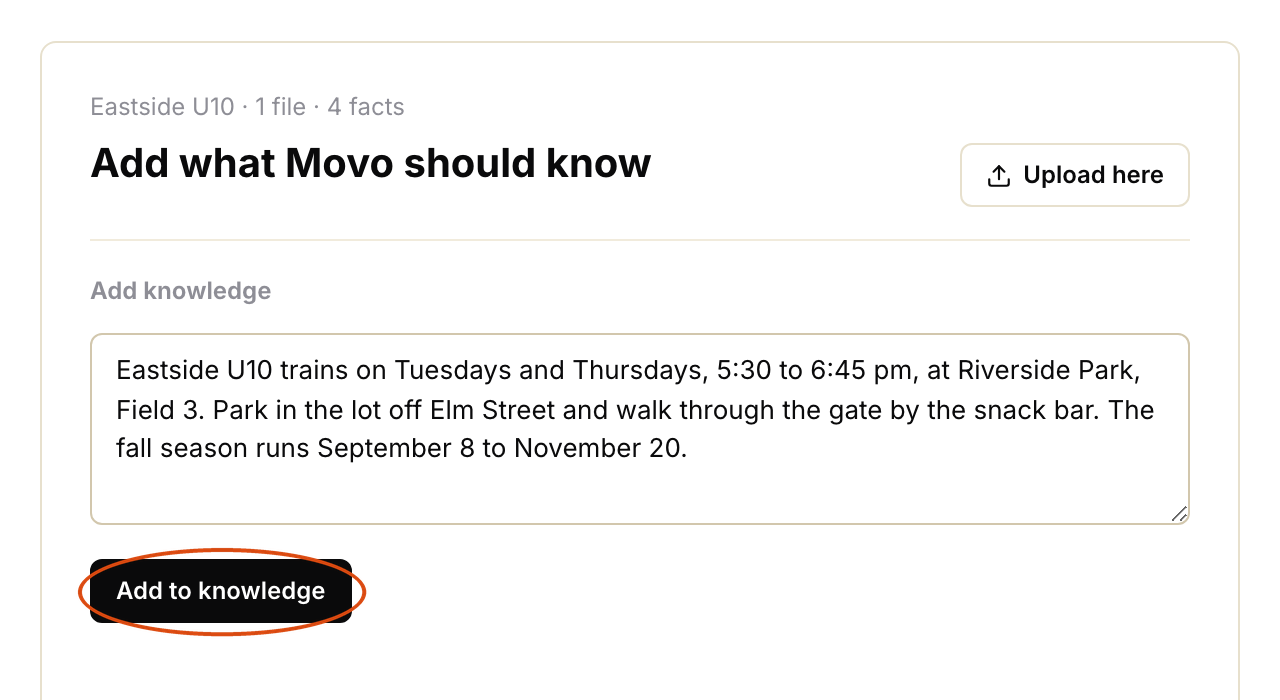
A few habits make a big difference:
- One topic per entry. Meeting times in one, fees in another. Movo finds short, single-topic facts far more reliably than one long entry.
- Write the answer, not a note to yourself. "We train Tuesdays and Thursdays, 5:30 to 6:45 pm" works. "Tues/Thurs eve" doesn't.
- Be specific. Weekday and date, am or pm, the full address, the exact amount.
- Say what's not true as well. "No session on October 12" stops Movo guessing.
- Give a fallback. "If you're not sure, email the coach at…" gives Movo somewhere to send people.
- Put an end date on anything temporary. "Early-bird price until September 1" won't outlive September.
Files
You can also upload a file to a level: PDF, Word, images, text or CSV. Click Upload here.

- Typed facts beat files. Movo finds a short typed fact more reliably than a page inside a 20-page PDF. If a file holds five things families ask, type those five things too.
- Keep files under 4 MB. A phone photo of a flyer or a printed page works well.
- If a PDF is a scan of a printed page, upload a photo of the page instead. Movo can read photos, but not every scanned PDF.
- A file is a snapshot. If the file changes, upload the new one and remove the old one.
Keep it current
Each level lists everything that lives there under Lives here. Click an entry to read it, edit it or remove it.

When something changes, change the entry the same day. Movo only uses the new answer from then on. Families who already got the old answer don't hear about the change unless you message them.
Once a season, go through each location's list and remove anything that's out of date.