Why does my menu look different?
Last updated: November 3, 2026
If a page or button you expected isn't there, or a teammate sees something you don't, there are a few usual reasons.
Where you're looking
Your menu follows the place you're looking at, not just your account. If you switch from your whole area to one location, the menu changes to that location's menu. Switch back and it changes again. See Switching between your locations.
Your level
What you see depends on the part of the organization you look after. Someone at one location has a shorter menu than someone looking after a branch.
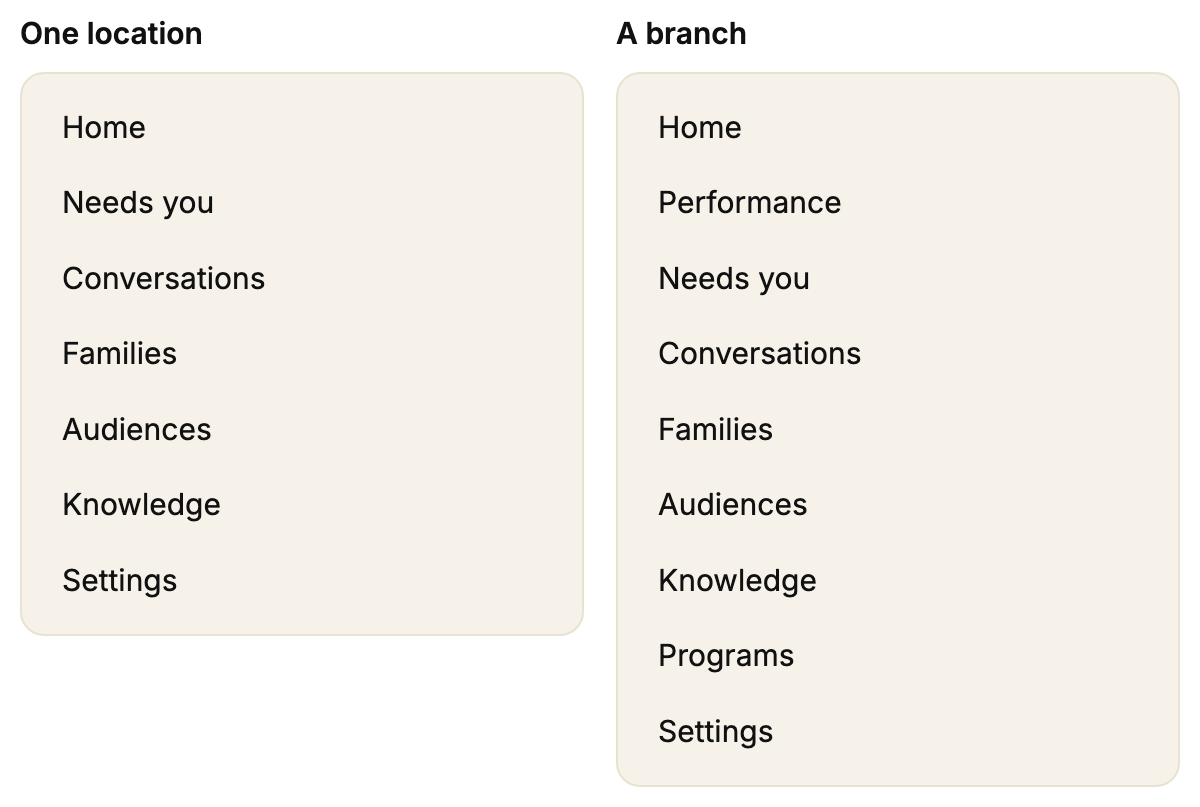
Looking at one location: there's no Performance or Programs.
Looking at a whole large organization: there's no Conversations. Switch to a branch or location to see it.
Settings changes too. Organization is only there if you look after more than one location. My location only shows while you're looking at one location.
See Who can see what.
You're not an admin
Only admins can invite people or change a family's contact details. Open Settings. If there's no Team tab, or you can't invite anyone there, you're not an admin. See How do I become an admin, and who is my admin?
Your account has limited access
Some accounts are set up to see fewer pages. Some actions can also be blocked, like sending a reply, inviting someone or assigning a family. You might see this message:

If you think you should have more access, ask your admin. If they can't change it, see How to get help from Movo.
Some pages are only on for some people
Chat and Pages are only switched on for some people. Other pages depend on what your organization uses.