Reading your Performance page
Last updated: November 3, 2026
Performance shows how joining is going across your area. Click Performance in the menu. Every number is all time, so there's no date range to set.
If it isn't in your menu, see Why does my menu look different? You won't see it while you're looking at one location.
The pictures below come from a test account. Your numbers will be different, and your page may use your organization's own words.
You may also see other tabs, like Pin data. This guide covers the Joining tab.
Three words to know
Lead: someone Movo is helping to join, who wasn't registered when they reached Movo.
Registered: they've joined. Each child counts on their own. A family with no child listed counts as one.
Escalation: a question Movo hands to a person.
The four numbers at the top

On the page | What it means |
|---|---|
Children have registered after reaching Movo | Leads who registered, plus children who joined a family that was already registered |
Of leads with three weeks in Movo have registered | Of the leads who've been in Movo for at least three weeks, the share who registered |
Of leads with three weeks in Movo have replied | Of those same leads, the share who replied to Movo |
Typical time to pick up an escalation | How long a family usually waits, after Movo asks for help, until someone takes it or resolves it |
If you look after part of an organization, some numbers also show the figure for everyone at your level, so you can compare.
Why three weeks?
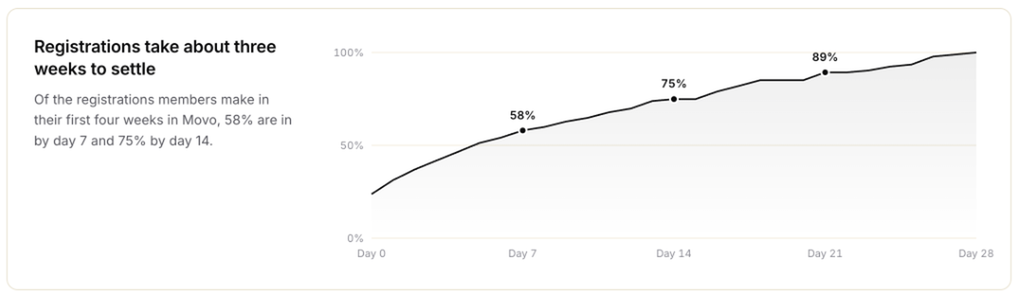
Families take time to join, so counting brand new leads would make the numbers look low. The first chart shows how quickly registrations come in. In this example, 58% of first-month registrations are in by day 7, 75% by day 14 and 89% by day 21.
The next card, called something like How each council converts, shows the share of leads who registered after three weeks.
How people started
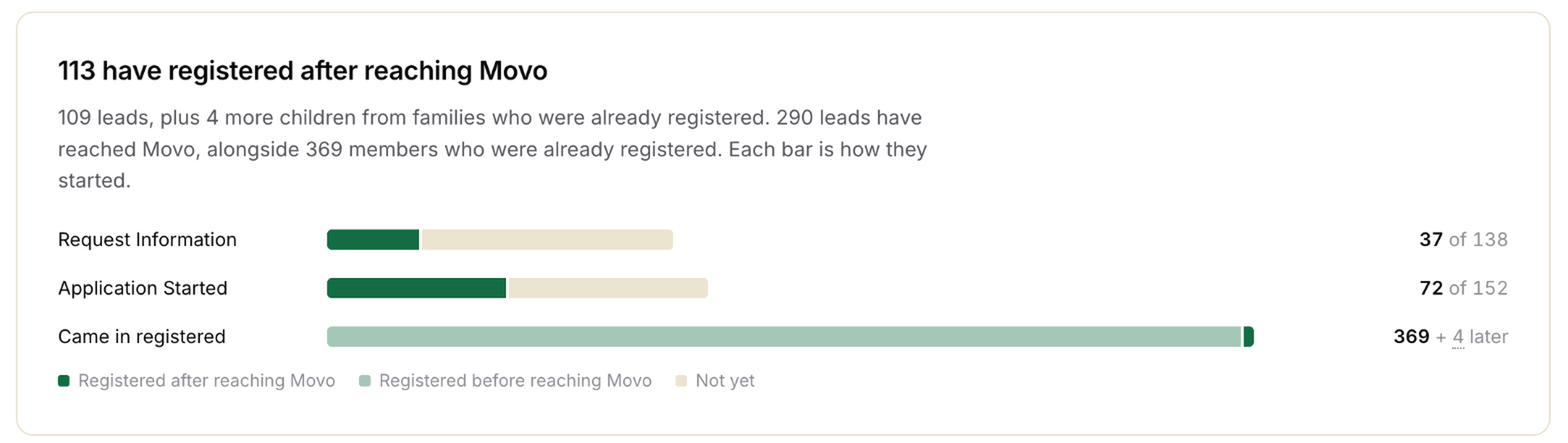
Each bar is one way people started. 37 of 138 means 37 of the 138 people who started that way have registered.
Dark green: registered after reaching Movo.
Light green: already registered before reaching Movo.
Beige: not yet.
Came in registered is everyone who was already registered when they reached Movo. + 4 later means 4 more children joined those families afterwards.
The comparison table
The map and table compare the parts of your area. Click a column heading to sort by it.

Column | What it means |
|---|---|
Leads entered | Leads who have reached Movo |
Leads converted | Those leads who have registered |
Registered after 3 weeks | The share who registered, of leads with at least three weeks in Movo |
Total registered | Everyone registered, whether they joined before or after reaching Movo |
Replied after 3 weeks | The share who replied, of leads with at least three weeks in Movo |
Escalations | Questions Movo has handed to a person |
Escalation pickup | How long those usually wait until someone takes them or resolves them |
Too new means not enough leads have been in Movo for three weeks yet. The number appears once they have. Unassigned is families with no location yet.
Messages
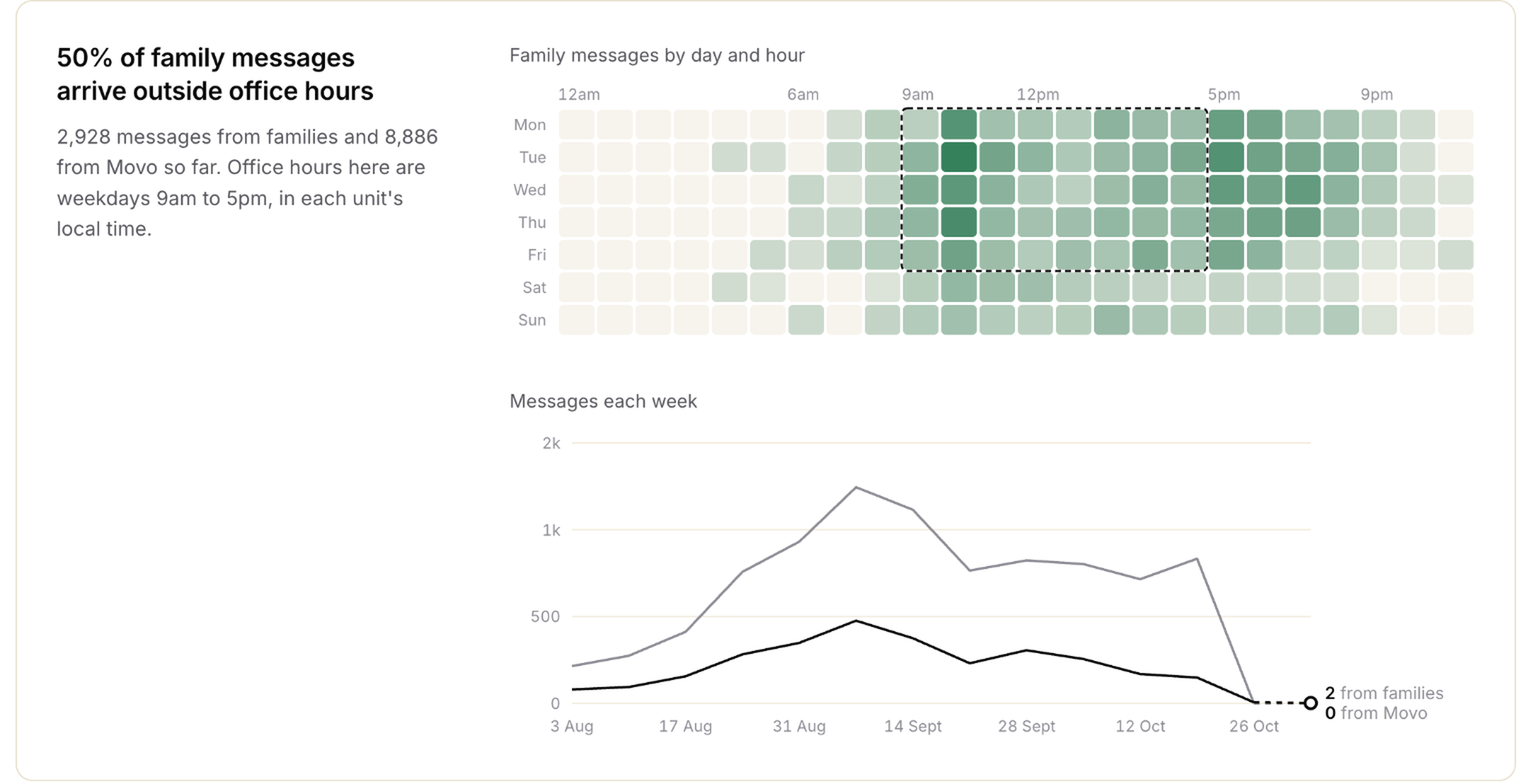
The grid shows when families message. Darker means more messages. The dotted box is office hours: weekdays, 9am to 5pm, in each location's own time.
The line chart shows messages each week. The grey line is Movo and the black line is families.
Escalations
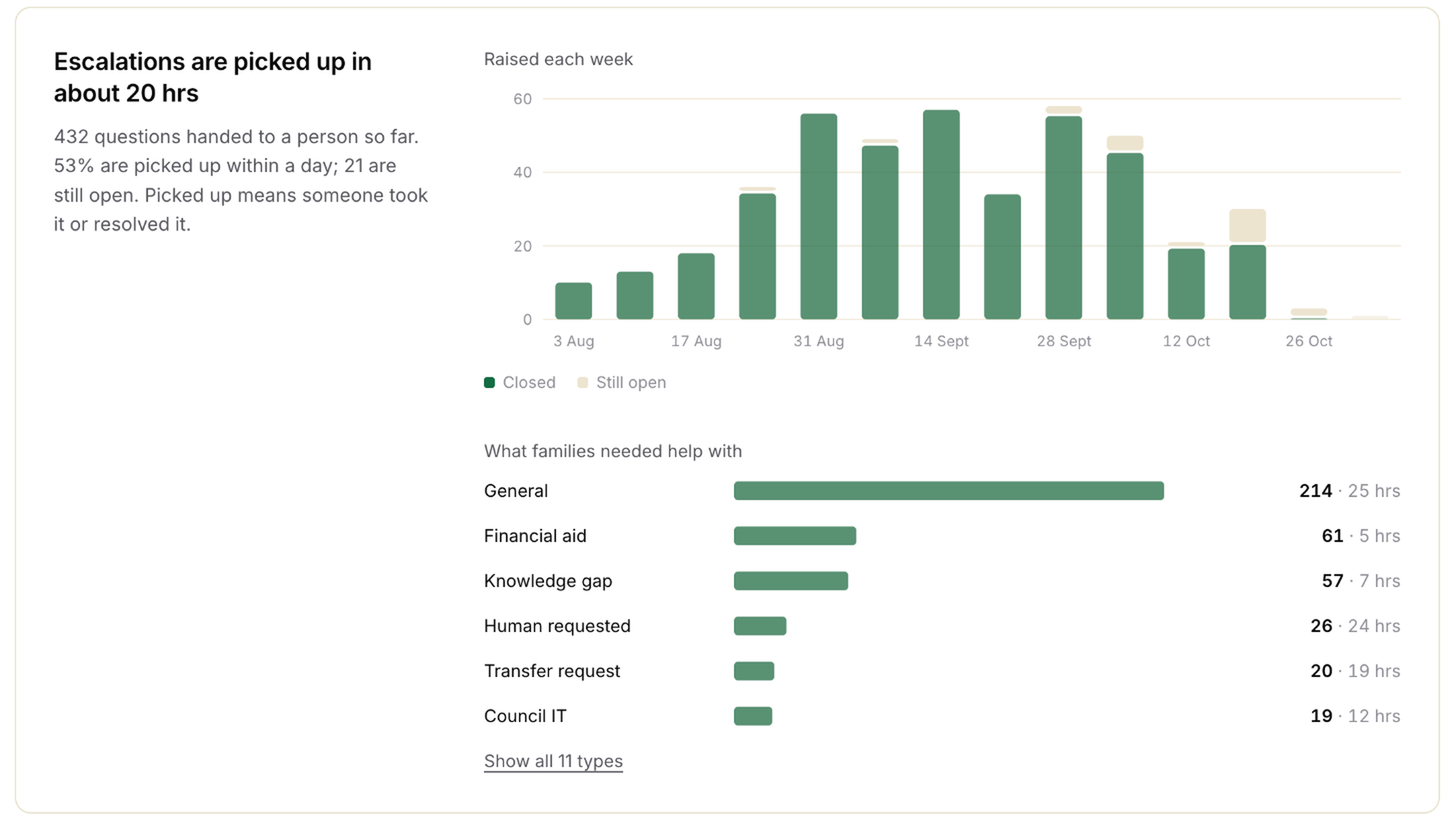
Picked up means someone took it or resolved it.
The bars show how many were raised each week. Green is closed and beige is still open. What families needed help with shows each kind of question, how many there were and how long they usually wait. 214 · 25 hrs means 214 questions, usually picked up in 25 hours.
What to look for
Time to pick up is high. Families are waiting too long for a person. Check who gets alerted. See Setting up escalation routing and timers.
One kind of question waits much longer. You can send each kind to different people. See the same article.
Few leads have replied. Check what Movo says first. See Audiences and behaviors explained.
Two buttons at the top right?
Some organizations can split leads by where they came from. Click each button to see that group. All the numbers change to match, and you may also see which lists brought in the most leads.
Does your page look different?
Some organizations see a different layout. It shows a funnel, from a new lead through to a child at their first meeting, and whether calls, texts and emails got through.
Why doesn't this match Home?
They count different things. See How we count who joined.